
Veeam Data Platform v13 is a significant step forward in cyber resilience, identity, and operational simplicity.
Built for hybrid and multi‑cloud environments, v13 helps you detect and contain threats faster, protect backup data with stronger defaults, and recover cleanly with confidence.
🔒 1) Security‑first architecture
V13 makes security a default posture. Backups are immutable by default, identity is strengthened with SAML‑based single sign‑on, and access is controlled with an enhanced RBAC model. There are native integrations with SOC and ITSM platforms, so your backup platform participates in incident response without brittle scripts.
Technical notes:
- Default immutability prevents alteration or deletion of recovery points during the lock period.
- SSO supports Microsoft Entra ID and Okta for federated login to the web UI and the Windows console.
- Enhanced RBAC allows custom roles scoped to inventories, repositories and restore actions.
- Integrations include CrowdStrike, Palo Alto Networks, Splunk and ServiceNow.
🤖 2) AI‑driven threat detection
Recon Scanner 3.0 and the Malware Analysis AI Agent provide real‑time visibility of adversary behaviours and speed up triage. They help you identify clean restore points before recovery, reducing the risk of reinfection.
Technical notes:
- Findings map to MITRE ATT&CK and flow into a triage inbox with severity.
- Veeam ONE Threat Center and Microsoft Sentinel integrations improve correlation and response.
- Malware analysis guides remediation and helps select safe restore points.
🐧 3) Hardened Veeam Software Appliance (VSA)
The Linux‑based Veeam Software Appliance (VSA) packages a just‑enough operating system with Veeam, pre‑hardened to DISA STIG. It removes manual OS care, reduces misconfiguration, and supports Security Officer approval for sensitive actions.
Technical notes:
- SSH disabled by default, MFA required for sensitive actions, services run under low‑privilege accounts, custom scripts are sandboxed.
- Delivered as ISO or OVA.
- True Zero Trust operations reduce base OS privilege exposure.
☁️⚡ 4) Instant Recovery to Microsoft Azure
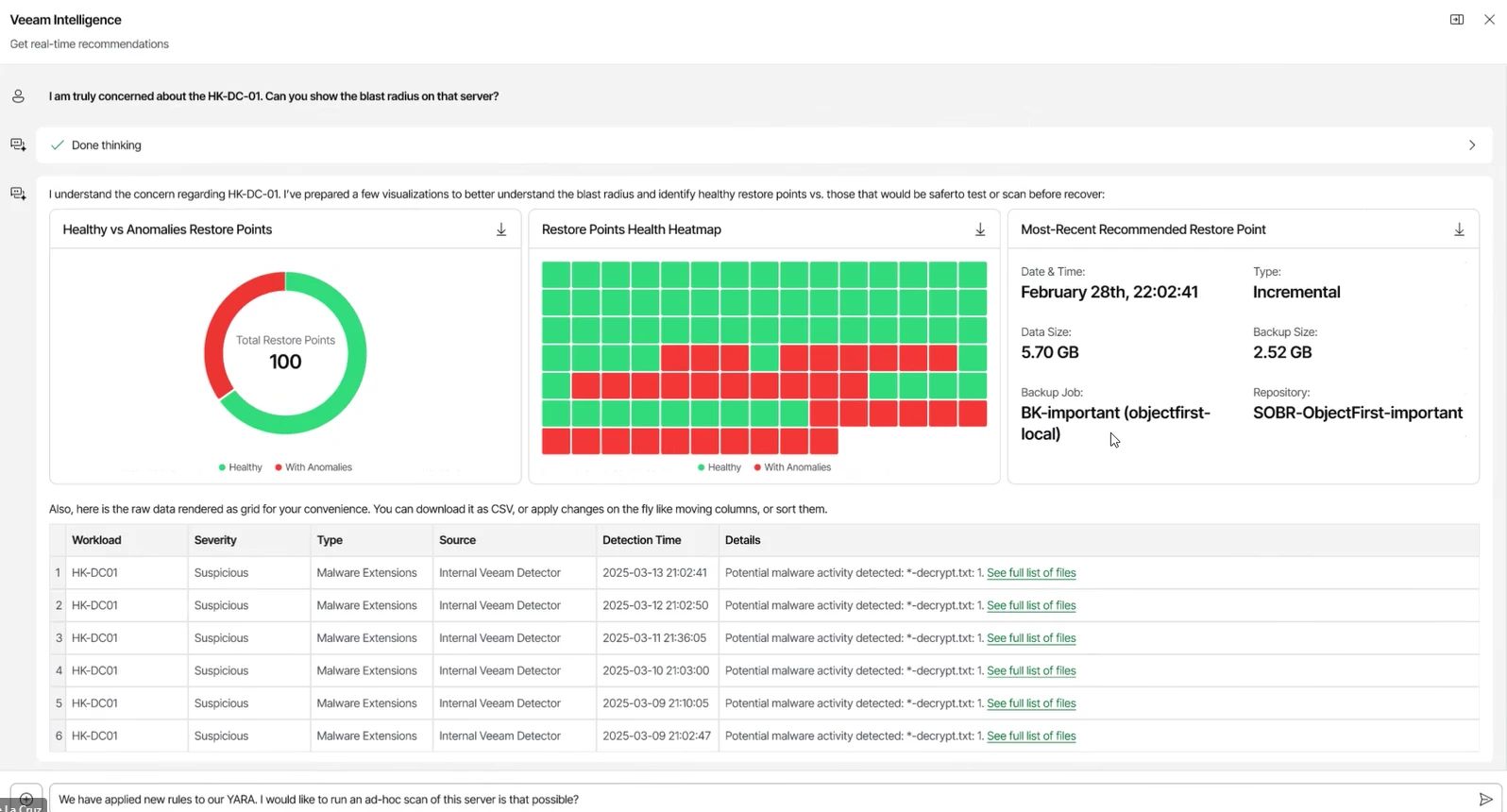
Instantly recover image‑level backups to Azure for clean‑room testing, ransomware triage and rapid failover. PowerShell support enables scripted DR runbooks and regular validation.
Technical notes
- Converts an on‑prem image backup to an Azure VM with compatible networking and storage mapping.
- Ideal for clean‑room recovery and fast workload mobility.
📊 5) AI‑powered observability and reporting
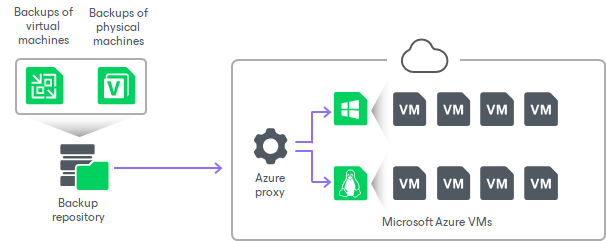
Veeam Intelligence adds interactive dashboards, anomaly detection and conversational reporting. In Advanced mode it uses Veeam ONEtelemetry to generate targeted insights and a daily AI summary with suggested actions.
Technical notes:
- Basic mode queries live Veeam documentation and KB sources.
- Advanced mode enables agents such as Malware Threat Analysis and Deep Data Analysis.
🧱 6) Immutability by default
Backups are immutable by default in v13, aligning with ransomware best practice. Use this with isolated hardened repositories for strong defence in depth and to maintain clean restore points.
🧩 7) Universal Hypervisor Integration API
A new integration framework gives current and emerging hypervisors a standard way to implement native backup and recovery integration. Coverage expands with platforms like Scale Computing HyperCore, with more on the roadmap.
Why it matters:
- Reduces lock‑in and gives flexibility if you are pivoting from legacy virtualisation stacks.
- Future‑proofs estates that need host‑based backup without bespoke engineering.
🌐 8) Modern, WCAG‑ready web UI
A browser‑based experience for common backup, copy and recovery operations across VMware vSphere and Microsoft Hyper‑V. It removes client dependencies and improves accessibility. The Windows console remains available with full functionality and a refreshed dark mode.
Technical notes:
- Manage primary jobs, scale‑out repositories and Cloud Vault, perform Instant VM Recovery, full VM and guest file restores.
- Built‑in dashboard provides a quick view of critical metrics.
🔐 9) Lockdown mode and true Zero Trust
Lockdown mode prevents the addition of unapproved infrastructure components. A Security Officer role introduces four‑eyes control for sensitive actions. Veeam Infrastructure Appliance management connections are passwordless and certificate‑based to reduce credential risk.
Technical notes:
- Protects data paths from exfiltration and unplanned network changes.
- Mutual certificate validation on first connect, persistent certificate‑based auth thereafter.
🔄 10) High availability and clean recovery
The VSA supports an active or passive cluster with continuous configuration database replication. One‑click failover and failback keep protection online during outages, and AI‑assisted clean‑restore selection reduces risk during DR.
Technical notes:
- Replication transforms secrets encrypted with machine‑specific keys for use on the passive node.
- Supports high‑latency links with local caching.
- Automated failovers available when Veeam ONE acts as cluster witness.
🗄️ Object First (Ootbi): the ideal storage foundation for Veeam v13
Ootbi by Object First is an on‑prem, S3‑native, immutable storage appliance engineered specifically for backup workloads. It aligns to Veeam v13’s security‑first model, removes complexity from object storage, and accelerates both backup ingest and instant recovery.
🛡️ Security and resilience
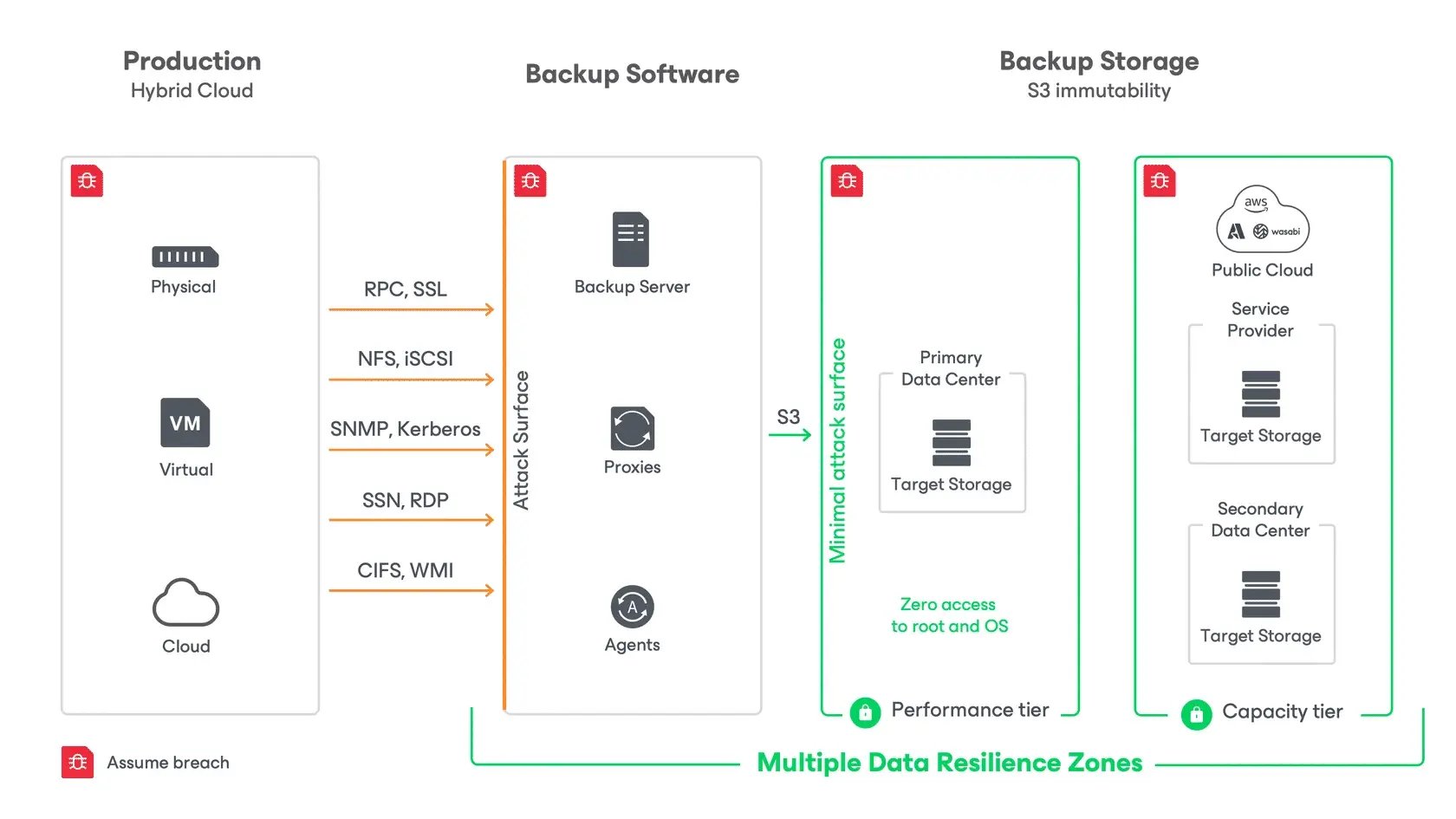
- S3 Object Lock immutability keeps objects write once, read many for the lock period, so recovery points cannot be deleted or altered. This bolsters v13 immutability and reduces reinfection risk during restores.
- Hardened Linux with zero root access ensures even privileged administrators cannot alter appliance settings or immutable data. This supports least privilege and separation of duties.
- Segmentation from the Veeam server separates the storage plane from the management plane, which limits blast radius. Combined with v13 RBAC, SSO and lockdown mode, it strengthens control.
- Continuous security validation through independent testing and a minimal footprint reduces attack surface.
🚀 Performance for backup and recovery
- Direct‑to‑object ingest optimised for large, sequential writes shortens backup windows and raises concurrency.
- SOSAPI‑aware instant recovery paths enable direct‑to‑node network access during restores, bypassing hops that cause I/O bottlenecks. Ootbi is certified for up to 80 concurrent instant recoveries, which is vital when many workloads must return quickly.
- High throughput at scale supports dense schedules across large estates.
⚙️ Simplicity and time to value
- Box‑to‑backup in about 15 minutes. Rack and power, assign three IP addresses, create a user with MFA, then target Veeam v13. No deep object storage expertise is required.
- Purpose‑built controls expose what backup administrators need, avoiding general‑purpose complexity.
📦 Capacity and scale
- Right‑sized tiers. Appliances ship at 192 TB, 384 TB, 576 TB and 768 TB usable, keeping immutability and performance consistent as you grow.
🧭 Reference architecture with Veeam v13
- Management plane: Deploy the VSA as the secure control plane. Enable SAML SSO, enhanced RBAC and lockdown mode so sensitive actions require the correct approvals.
- Primary backup tier: Present Ootbi as the immutable S3 target for direct‑to‑object backups. Enforce object‑level retention to match recovery objectives.
- Copy and isolation: Add a secondary Hardened Repository or a cloud copy tier using Veeam copy jobs for defence in depth.
- DR and validation: Script Instant Recovery to Azure for clean‑room tests and periodic validation. Use v13’s AI‑assisted malware analysis to confirm clean restore points before failover.
❓ FAQs
🔧 What is the quickest secure way to deploy Veeam v13?
Use the Veeam Software Appliance (VSA) for a pre‑hardened, Linux‑based deployment with automated updates, SAML SSO, and enhanced RBAC. It reduces OS management, aligns with Zero Trust, and speeds time to value.
🧼 How does v13 help ensure clean recoveries after a cyber incident?
Recon Scanner 3.0 and the Malware Analysis AI Agent highlight suspicious activity, map behaviours to MITRE ATT&CK, and help select clean restore points. Combine this with immutability by default to lower reinfection risk.
🗄️ Where does Object First (Ootbi) fit in a v13 design?
Use Ootbi as the primary on‑prem immutable S3 target for direct‑to‑object backups. Pair it with a secondary hardened repository or cloud copy tier for defence in depth.
🐧 Can I run a Linux‑only Veeam infrastructure with v13?
Yes. V13 supports a complete Linux‑based backup infrastructure, including the VSA, proxies, repositories, and mount servers.
☁️ Does v13 support Instant Recovery to Microsoft Azure for DR tests?
Yes. V13 can instantly recover image‑level backups directly to Azure, ideal for clean‑room recovery, DR rehearsals, and rapid failover.
📦 What capacity options exist for Object First Ootbi?
Ootbi appliances ship in multiple usable capacity tiers, typically 20TB -768 TB, so you can scale on‑prem storage predictably while keeping immutability and performance.
⚙️ Do I need deep object storage expertise to run Ootbi?
No. Ootbi is box‑to‑backup in about 15 minutes with minimal configuration. It is purpose‑built for backup operations and exposes the controls backup admins actually need.
🔐 How do RBAC and SSO in v13 help with compliance?
Custom RBAC roles enforce least privilege for backup and restore, while SAML‑based SSO centralises identity and enables MFA passthrough. Together, they simplify access governance and audit.
🚀 How many concurrent instant recoveries can Ootbi support?
Ootbi is certified for up to 80 concurrent instant recoveries thanks to SOSAPI‑enabled direct‑to‑node network paths that avoid unnecessary hops.
🔁 Should I add a secondary copy tier if I am already immutable on Ootbi?
Yes. A secondary hardened repository or cloud object copy tier provides isolation and geographic flexibility. It complements primary immutability and strengthens recovery assurance.
🧠 What this means for your organisation
Veeam v13 plus Object First strengthens every stage of your resilience journey. Identity and access are tighter, backups are safer by default, telemetry is smarter, and recovery to Azure is faster. The storage layer is simpler and more secure, which reduces operational risk and shortens time to value.
🤝 How VTG can help
Velocity Technology Group designs and runs modern data protection for hybrid estates. We can validate your recovery objectives, implement VSA with best practice identity and RBAC, and stand up immutable storage with Ootbi.
If required, we can script Instant Recovery to Azure and schedule clean‑room tests so you have evidence that recovery is assured.
Book a 60 minute Veeam v13 readiness and storage design session with the VTG team. We will review identity, immutability, storage throughput and DR runbooks, then recommend a right‑sized architecture using VSA and Ootbi.


.png)